Studio Tools & Edit Bar
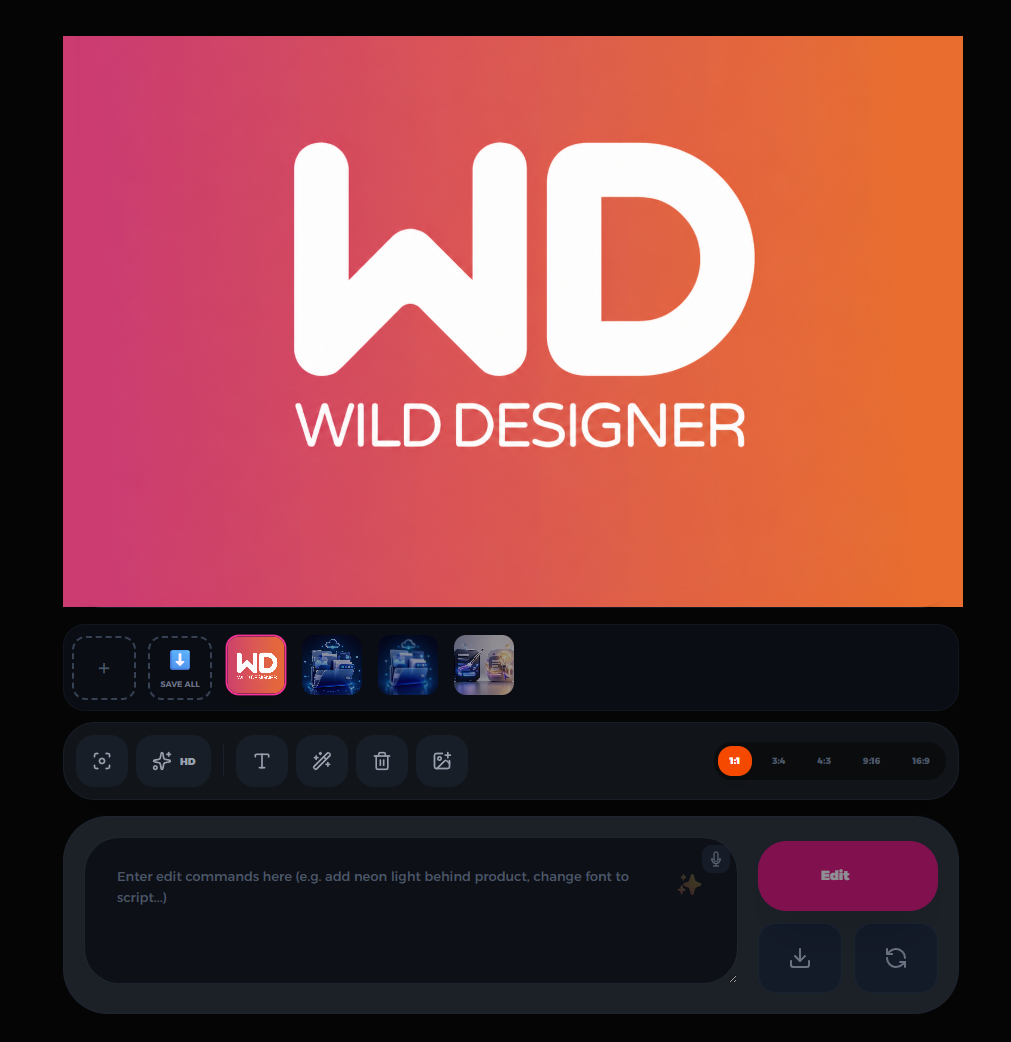
Here you can unleash your creativity and edit your generated designs, or even add external images directly to your workspace. Enjoy unlimited flexibility; replace people or products by attaching an image, or simply write your request in the prompt box to see it executed instantly. Request color changes, text modifications, or translate the content into any language. You can also upscale quality, resize, retouch the design, or use the magic mask for targeted edits...
Aspect Ratios
Easily switch between different dimensions (1:1, 3:4, 4:3, 9:16, 16:9) to fit various social media platforms perfectly.
Add Media
Insert new images or backgrounds directly into your canvas to combine elements and enrich your design.
Clear Text
This tool is exclusively designed to instantly and cleanly remove any unwanted text from your image without affecting the base design.
Magic Retouch
This is a magic button designed to apply professional retouching to your design, visually enhancing it with a single click.
Change Typography (Aa)
Use this tool to change the typography style in your design, applying a different and creative visual style to your text.
HD Upscale
Enhance the quality and resolution of your design with a single click. This tool allows upscaling your image up to professional 4K resolution.
Smart Selection
Precisely select specific elements or areas within your design for targeted editing.
AI Prompt & Voice
Type or speak your edit commands (e.g., 'Add neon lights in the background') and hit Edit.
Reset Workspace
Use this tool to completely clear and reset your workspace, allowing you to start fresh and build a new design from scratch.
Save All
Download all generated ads and variations at once with a single click to save time and effort.